Email wasn't made for
collecting documents.

FileReq is.

Send a link. Receive everything you need.

AC
Alex Carter
Senior Accountant · Meridian Advisory
alex@meridian.com

Hi Sarah Mitchell, please upload the documents for:

Annual Tax Return
Profit & Loss Statement *
Bank Statements (Oct-Dec) *
ABN *
TFN *
Additional Notes
Not right for you? Full refund within 30 days. No questions asked.

You shouldn't have to follow up your clients.

Every document request turns into a thread. Then a follow-up. Then another. Then a spreadsheet to track who's sent what. It's not your job — but somehow it takes up half your day.

Four steps. Zero follow-ups.

1

Build your request

Create a request with exactly what you need — file uploads, text fields, dates and more.

2

Send it in one click

Your client receives a personalised email with a link to their portal. No login, no app, no confusion.

3

Your client handles the rest

Your client completes their portal at their own pace. If anything is outstanding, automatic email reminders chase them for you.

4

Done. Nothing missed.

Every file, every response, collected and ready to download — all in one place.

Built for how professionals actually work.

No onboarding calls. No complex setup. Everything your business needs, nothing it doesn’t.

Request anything

One place to ask for everything. Once.

File uploads, text responses, dates, yes/no confirmations — build the exact request your workflow requires. Add notes per item so your client knows exactly what’s needed. No ambiguity. No back-and-forth.

File uploads Text fields Date fields Yes/No Notes per item Required field controls
Request Builder
Bulk sending

Send to 250 clients. In the time it takes to send to one.

Upload a CSV, map your fields, and send personalised requests to your entire client list at once. Each client gets their own private portal — personalised to them, branded to you. Built for tax time, audit season, or any period where one-by-one simply doesn’t cut it.

CSV import Personalised per recipient Individual portals Bulk progress dashboard
Bulk Send
Never follow up manually again

Set the reminders once. FileReq does the chasing.

Configure automatic email reminders on your schedule — 3 days, 7 days, final notice. FileReq sends them on your behalf, in your name, from your domain. You’ll never write “just following up” again.
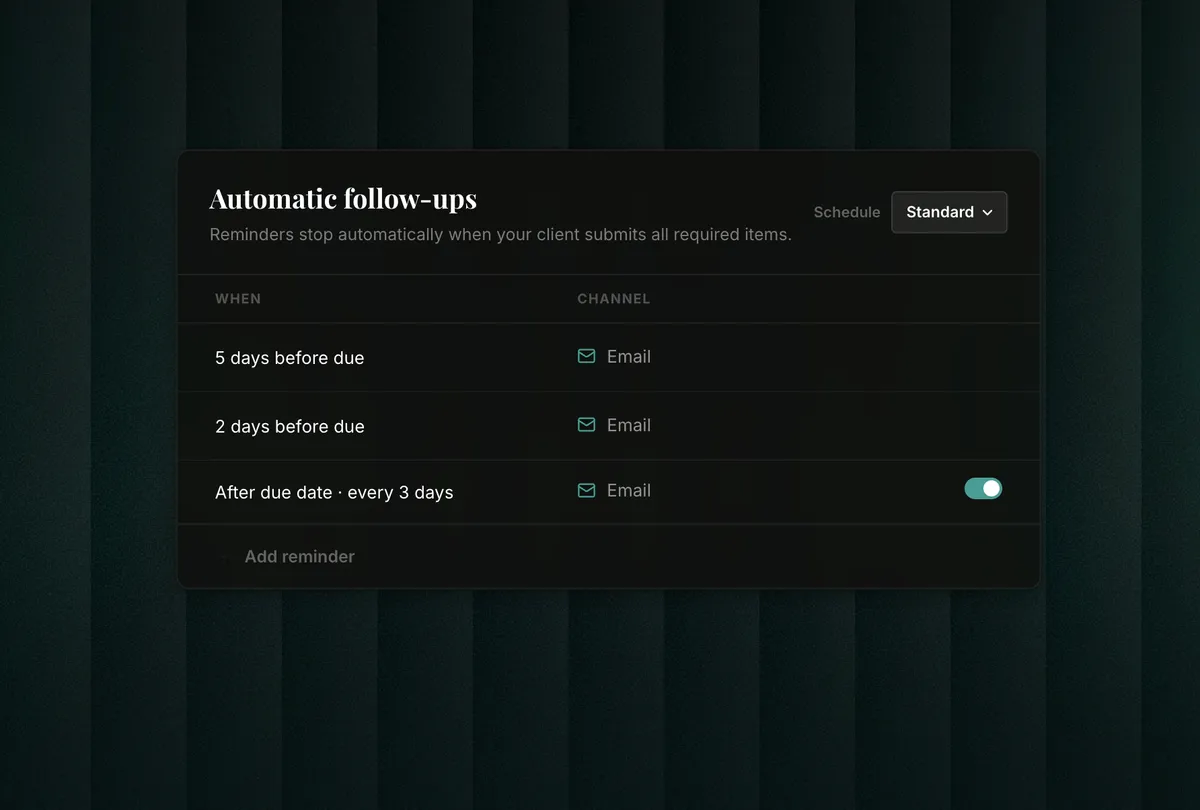
Email reminders SMS reminders (coming soon) Custom schedule Sent in your name Stops when client submits
Automatic email reminder configuration
Everything in one place

Downloaded in one click. Not forty-seven.

Everything lands organised by client and request. Download a single file, a full submission, or everything at once as a ZIP. Need only the PDFs from a selection? Filter by file type and download exactly what you need — no digging through folders, no renaming, no wasted clicks.
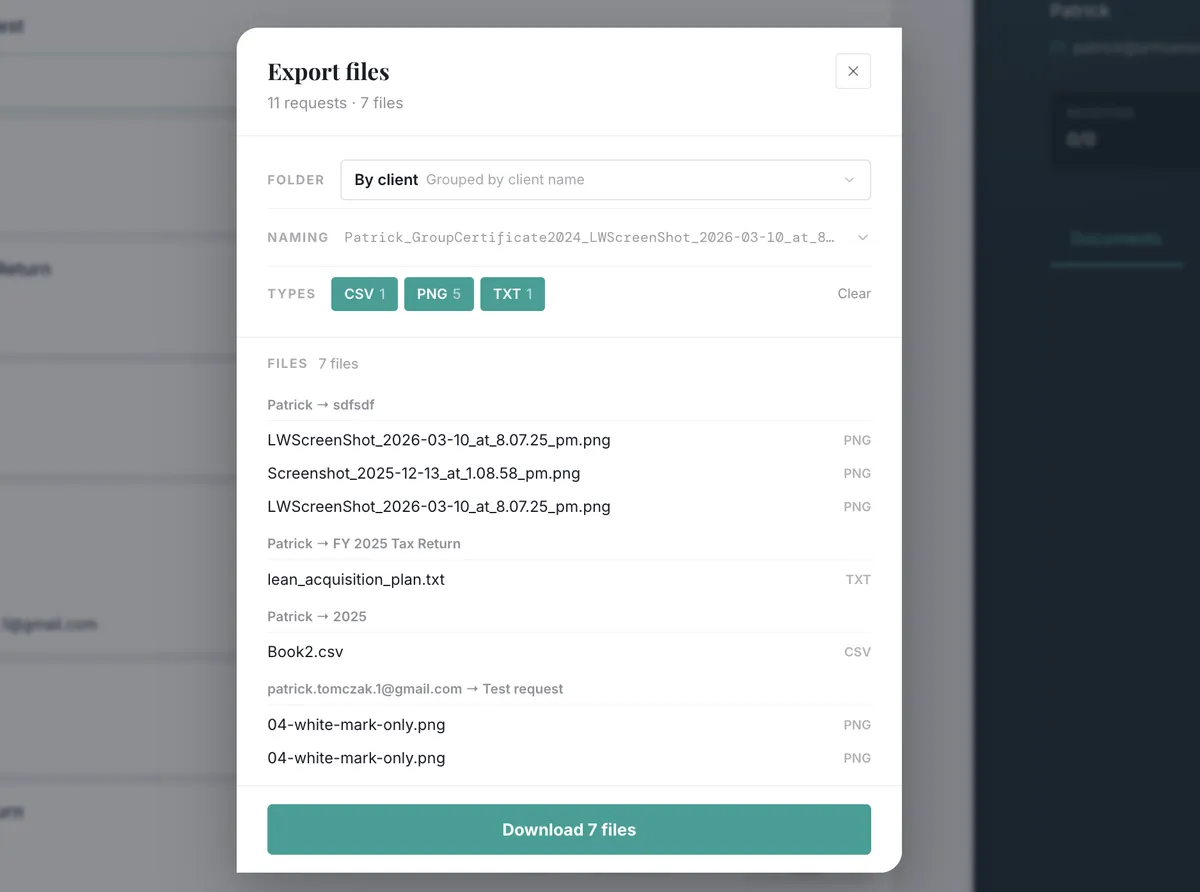
Filter by file type Selective download Bulk ZIP download CSV export Organised by client
One-click download manager with bulk ZIP and file type filtering
Your brand, not ours

Your clients see your brand. Front and centre.

Every portal, every email, every reminder goes out under your name with your logo and colours. On every plan. On Practice and Enterprise plans, remove FileReq branding entirely — your clients will never know what’s running behind the scenes. Send from your own domain too: requests@yourfirm.com.
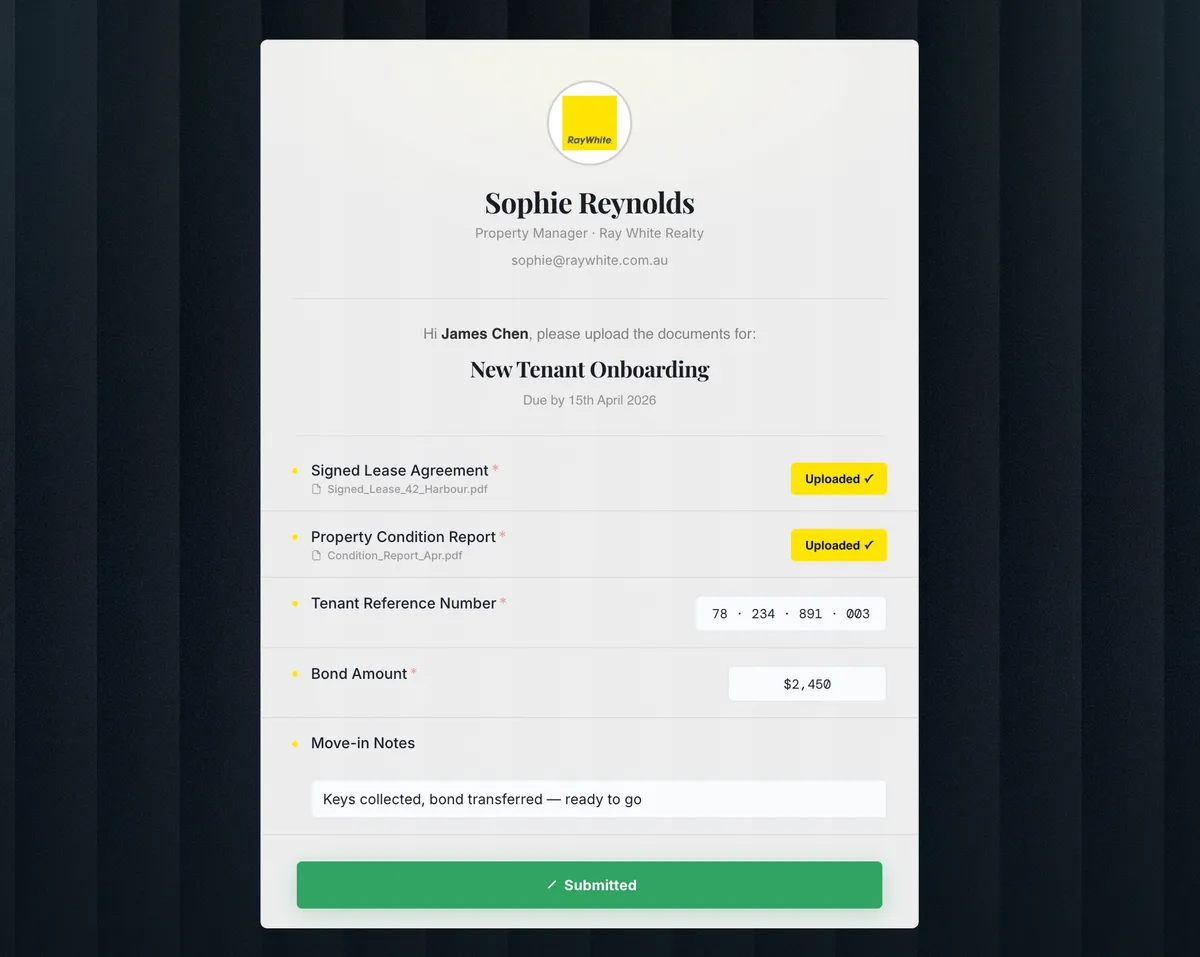
Logo & colours on all plans No FileReq branding Custom sending domain (Pro+) Custom portal domain (Pro+)
White-label branded portal customisation

Every request. Every client. One glance.

Track progress, spot overdue items, and download everything — without digging through email.

New Request
Requests
Client Request
Smith Family Trust
Annual Tax Return 6/6
Complete
Trust Distribution Minutes 2/4 Due in 5 days
In Progress
Rivera Consulting
Q3 BAS Documents 4/4
Submitted
Chen & Associates
Onboarding Pack 2/5 Due 12 Apr
In Progress
Northside Medical
Audit Documents 0/3 Overdue
Overdue
Jade Logistics
Q3 BAS Documents View Portal
Rivera Consulting
maria@riveraconsulting.com.au
Sent 18 Mar
Received 4/4
Status Awaiting Review
Due Due 8 Apr
Documents Activity
Activity Statements · File upload
Received
Bank Reconciliation · File upload
Received
GST Worksheet · File upload
Received
Director Declaration · File upload
Received

FileReq exists because chasing clients for documents is nobody’s job.

It’s just everyone’s problem.

Simple, transparent pricing.

All plans include unlimited requests — send as many as your work demands, without watching a counter. You’re billed by the number of unique clients you work with each month, not by how much you use the product.

Monthly
Annual2 months free
Solo
For solo practitioners
Everything you need to get started and look professional from day one.
$65 /month
Billed annually at $790/yr
50 unique recipients / month
Unlimited requests
Unlimited storage
SMS reminders (coming soon)
2 users
Automatic email reminders
Client portal with your branding
Batch send to multiple clients
File & document collection
Form & information collection
Unlimited templates
Client management & tags
Bulk file download
Multi-page requests
Reference file attachments
6 portal themes
Enterprise
For larger firms & agencies
Multi-brand, multi-team. Built for firms that operate at scale.
$207 /month
Billed annually at $2,490/yr
300 unique recipients / month
Unlimited requests
Unlimited storage
SMS reminders (coming soon)
15 users
Everything in Practice, plus:
Dedicated onboarding call
Direct support line
Xero Practice Manager (coming soon)
Karbon integration (coming soon)
Custom portal domain (coming soon)
API access (coming soon)
Advanced analytics (coming soon)
Not right for you? Full refund within 30 days. No questions asked.

Got questions? We’ve got answers.

A unique recipient is any email address that receives a request from your account within your billing month. The count resets on your monthly billing date. Deleting a contact does not reset their count.
No. All plans include unlimited requests. You can send as many document requests as your work demands — there’s no counter watching you.
No. Your clients receive an email with a link. They click it, complete their portal, and submit. No account, no app, no friction.
Yes. Everything your client uploads or fills in is saved automatically. They can close the browser, come back days later using the same link, and pick up right where they left off — no work lost.
No. All client-facing emails and portals display your logo, your colours, and your business name — on every plan. FileReq is invisible to your clients. On Practice and Enterprise plans you can also send from your own domain entirely.
SMS reminders are coming soon. When available, FileReq will send your client an SMS on your behalf when they haven’t submitted by a reminder threshold you set.
Yes — bulk sending is available on the Practice plan and above. Upload a CSV, map your fields, and send personalised requests to your entire client list in one action. Each client receives their own private portal.
From your dashboard you can download individual files, a single client’s entire submission, or everything at once as a ZIP. You can also export structured responses as a CSV.
Yes. Every plan starts with a free trial — no credit card required. You’ll have full access to all features on your chosen plan during the trial period.
Clients can upload PDFs, Word documents, Excel spreadsheets, images (JPG, PNG), and CSV files. You can restrict which types each upload field accepts when building your request.
All files and data are stored in Sydney, Australia (AWS ap-southeast-2) and never leave Australian shores. Data is encrypted in transit with TLS 1.2+ and at rest with AES-256. We don’t sell your data or use it for AI training.
Yes. On Practice and Enterprise plans you can connect Google Drive or OneDrive so submitted files are automatically synced to a folder of your choice. Integrations with Xero Practice Manager and Karbon are coming soon.
FileReq detects bounced emails automatically and flags them on your dashboard. Bounced recipients don’t count toward your monthly quota, so you’re never charged for a delivery that didn’t land.
Yes. Set a due date on any request and configure email reminders to fire at intervals you choose — for example, 3 days before the due date and every 5 days while overdue. Reminders stop automatically once the client submits.

The last time you’ll chase a document.

Set up in under 10 minutes. Your first request out the door today.

No credit card required Cancel anytime Setup in under 10 minutes